
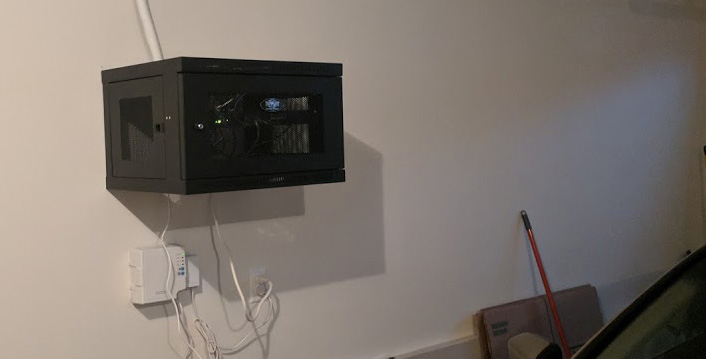
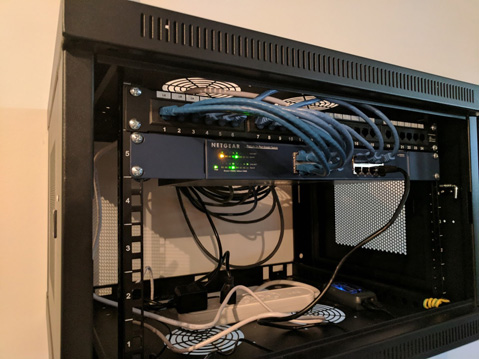
I’m astounded that homes are still being built today without ethernet. I think there is still a large population out there that doesn’t know what it is or don’t know why they need it. All homes are wired with coaxial, but many are not wired with ethernet. I’ve always preferred a wired connection over wireless for the stability and speed. It is also just a little bit more secure. I’d never want to get rid of my wireless altogether but I prefer a hybrid network where both coexist. I’m going to discuss some of the products I purchased to help accomplish the task. Your needs may vary.
Hardware:
- Nighthawk X6 AC3200 Router
- Netgear 16-Port Gigabit Switch
- Tripp Lite 6U Wall Mount Rack
- 24 Port Gigabit Patch Panel
- 1000ft. CAT6 Riser
As an Amazon Associate I earn from qualifying purchases.
Cost Estimate:
- Labor: $550
- Hardware: $310
- Router/Switch: $500
- Total: $1360
If you already have your own router and/or switch you can save some money here. The cost estimate above assumes you have nothing. Your mileage on labor might also vary depending on your location and contractors in your area.
In fall of 2017 I purchased a new home. Unfortunately it was not wired how I wanted it. In college I minored in networking, so I had knowledge of terminating connections and making my own ethernet cables. I thought I wanted to tackle it myself until I went up into the attic. There was insulation everywhere. How would I find the walls and drill the holes where I needed them? Did I have the right tools? I decided I would hire someone to help me out. The contractor agreed to let me order my own parts and help terminate at the walls, saving them a little time and me a little money.
Prior to wiring I had my ISP come out to setup a fiber obtic ONT in the garage. Because the garage is well insulated enough I thought it would be ok to act as a wiring closet. My only worry about the environment was dust and dirt blowing in when the garage door opens, but I sweep the garage very regularly so this would help things. I still didn’t want my fancy new router in the garage because that would hurt the wireless signal. It was also a larger investment than my other networking hardware so I wanted to protect it a little more.
The switch I’ve had laying around for a while. It was a rack mountable switch, even though I didn’t have a rack previously. This comes in handy for this task because I decided to purchase a small cabinet to house my devices and keep them protected.
I went with CAT6 as my standard, because I wanted this to last a long time. I decided to use a patch panel, because if I ever needed to replace the switch I can swap it out without fear of damaging cables. The patch cables don’t need to last long. Also I thought it would come in handy if I ever wanted to move things around the house. Perhaps I wanted to move the router to a different room. Or maybe I wanted to create segmented networks. I don’t have a big house, but I do like to have some flexibilty. I don’t know what types of devices I’ll have in the future.
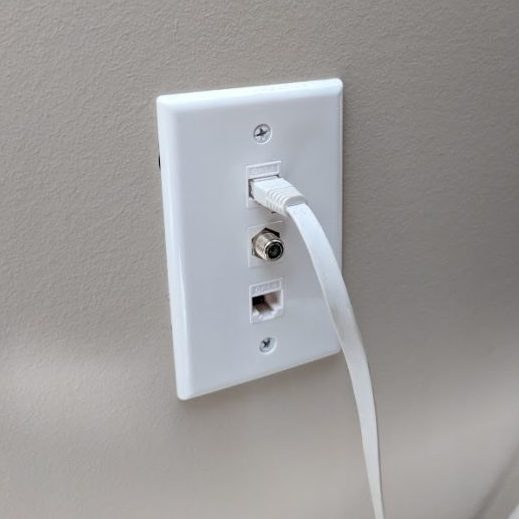
I purchased 1000ft of cabling. That was enough to cover my 1600 sq. foot house how I needed it. We ran 4 cables to a living room gang plate, 4 cables to the office, 2 in the guest bedroom, and 2 in the master bedroom. So that only covers half of my switch. I figured that would leave a little more room to expand or add devices to the cabinet.
Once the wiring was complete and all the ports tested out, I tossed a Raspberry Pi in, to act as a controller for my new Smart Home project. I also put a Liftmaster Internet Gateway in the cabinet so that I could control my garage door with my Smart Phone.